Fortsetzung zum vorherigen Beitrag, in dem Proxmox Virtual Environment selbst auf seinem eigenen Hypervisor betrieben wird. Diesmal lassen wir VMWare ESXi auf dem Proxmox VE laufen, ebenfalls als Testumgebung.
Zu beachten ist, das die Virtualisierungs-Unterstützung der CPU wie im vorherigen Blog-Beitrag geschildert aktiviert werden muss, und der CPU Typ ebenfalls auf Host gesetzt werden muss.
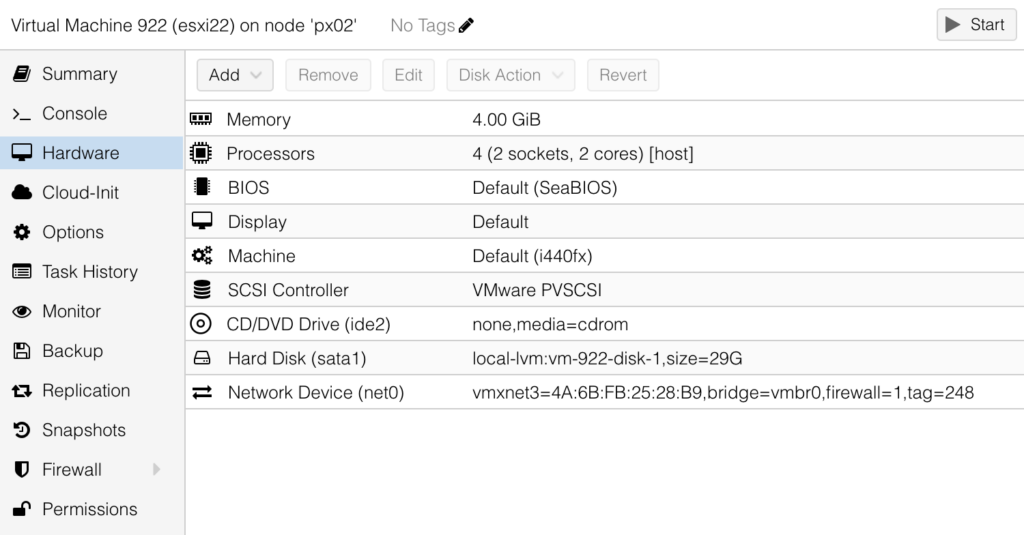
Hier die Übersicht, wie die VM konfiguriert werden muss, damit sich ESXi installieren lässt:
- General Tab
- Leave Defaults
- OS Tab
- Guest OS -> Type: Linux
- Guest OS -> Version: 6.x – 2.6 Kernel
- System Tab
- SCSI-Controller: VirtIO SCSI single (default) works, but better use VMware PVSCI
- Disk Tab
- Bus/Device: SATA (ESXi did not find any other Type!)
- Disk size (GiB): 29 is absolut minimum vor OS Partition (otherwise Installation will fail with something like …. does not support OSDATA …
- CPU Tab
- Sockets: 2
- Cores: 2
- Type: host
(don’t now if there is a minimum, but 2 Cores on 2 Sockets worked)
- Memory Tab
- Memory (MiB): 4096 (required minimum)
- Network Tab
- Model: VMware VMXnet3 (ESXi did not find any other Type!)
This Setting worked pretty well for me, some other Blog-Posts recommended the following, which had no performance improvement in my case, but should not stay unmentioned :
- System Tab
- Machine: q35
- Disk Tab
- Discard: ☑️
- SSD Emulation: ☑️
- CPU Tab
- Enable NUMA: ☑️
Schreibe einen Kommentar